 Dumpling Dash
How to delete game data on Android, step by step
A calm guide for parents: wipe a game's progress, start fresh for a sibling, or clean up before you hand a phone on.
In this guide
To delete game data on Android, first look for a delete or reset option inside the game's settings. If there is none, open your phone's Settings, go to Apps, pick the game, open Storage and tap Clear storage (some phones say Clear data). Uninstalling also removes what the game kept on the phone. None of these touch progress saved in an online account, which you delete with the game's developer.
There are plenty of good reasons to wipe a game. A younger sibling wants to start from level 1. A child typed the wrong birth year on the first screen. You are passing an old phone to a cousin. Or you simply want to know what a game keeps about your family and how to remove it.
Android gives you more than one way to do this, and they do slightly different things. This guide walks through each option in plain steps, explains what it removes and what it leaves behind, and uses our own game, Dumpling Dash, as a worked example.
First, know where the game keeps its data
Before you delete anything, it helps to know where a game's progress actually lives. There are two common places.
- On the phone. Many simple games save levels, coins and settings in the app's own storage on the device. Deleting that storage resets the game.
- In an online account. Some games link to a login, a Google Play Games profile or the developer's own servers. That copy lives on the internet. Wiping the phone does not touch it, and the game may pull the old progress back the next time you sign in.
The game's privacy policy usually says which one it uses. Dumpling Dash is the first kind: it has no accounts and keeps progress only on the phone, so there is nothing on our servers to delete. Our parents' guide to Dumpling Dash covers the rest of what the game does and does not do.
Option 1: use the game's own delete button
This is the cleanest route when a game offers it, because the game knows exactly what it saved. Look in Settings, Options or a gear icon for words like "Delete my data", "Reset progress" or "Start over".
Here is how it works in Dumpling Dash:
- Open the game and tap Settings on the right side of the home screen.
- Tap Delete my data.
- A card titled Ask a grown-up appears with a times-table question, such as "What is 6 × 7?". Pick the right answer from the four buttons. Cancel closes the card and keeps everything.
- The game wipes its save on the phone (levels, coins, gems, skins and the birth year) and restarts.
- You land on the welcome screen that asks "What year were you born?", just like the very first launch. Pick the year and you begin again from level 1.
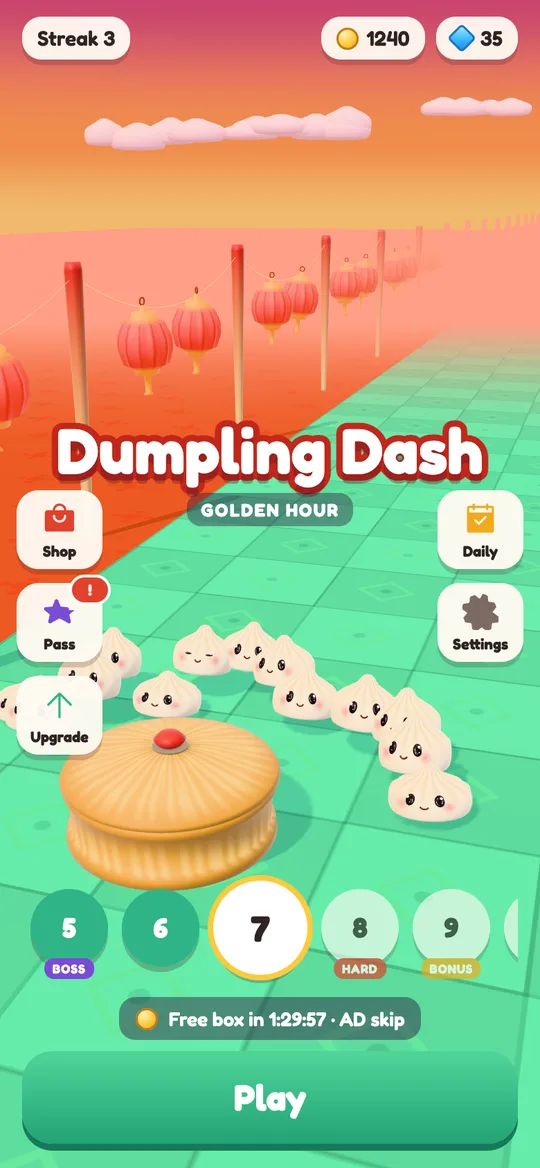
A wrong answer to the question closes the card and nothing is deleted, so a curious tap cannot wipe a child's progress by accident. If you want to know more about that little question, read what a parental gate is and why games use one.
Option 2: Clear storage in Android Settings
Every Android phone can wipe an app's local data, even when the game has no delete button. Menu names differ a little between phone makers and Android versions, but the path is close to this:
- Open the phone's Settings app.
- Tap Apps (on some phones, Apps & notifications), then See all apps if the list is short.
- Find and tap the game.
- Tap Storage & cache or Storage.
- Tap Clear storage or Clear data, then confirm.
The next time the game opens, it behaves as if it was just installed.
Clear storage vs clear cache
The same screen has a second button, Clear cache, and it is easy to mix them up.
- Clear cache removes temporary files the app can rebuild, such as downloaded pictures. Progress stays.
- Clear storage removes everything the app saved on the phone, including progress and settings. It cannot be undone.
If you only want to free a little space or fix a glitch, try Clear cache first. If you want a fresh start, you need Clear storage.
Option 3: uninstall the game
Uninstalling removes the app and the data it kept on the phone. Press and hold the game's icon, tap Uninstall (or drag it to Uninstall), and confirm. You can also uninstall from the game's page in the Google Play Store app.
One thing to know: many Android phones back up app data to the owner's Google account. If that backup is switched on, Android may put some of a game's data back when you install it again later. If you reinstall and want a truly fresh start, use the game's delete button or Clear storage once more after installing.
What deleting game data does not remove
Wiping a game on the phone is only part of the picture. A few things live elsewhere.
- Online accounts and cloud saves. If a game has a login, ask the developer to delete the account. Look for an email address or a deletion page in the privacy policy. Dumpling Dash has a delete your data page that explains its setup.
- Ad data. Games with ads use ad services that handle their own data. On Android you can reset or delete the advertising ID in the phone's Google settings, under Ads. In Dumpling Dash, players 13 and over can also change ad consent in Settings → Ad privacy choices.
- Purchases. Things bought through Google Play are tied to the Google account, not the save file. Dumpling Dash has no in-app purchases, but for other games our guide to turning off in-app purchases on Android is a good next step.
A quick routine before you pass a phone on
If the phone is going to someone else, a few minutes now saves surprises later.
- Delete in-game accounts first for any game that has a login, while the game is still installed.
- Use each game's own delete button where there is one.
- Clear storage or uninstall the games that have no button.
- Check the Google account on the phone. Removing it, or resetting the phone, stops backups from coming back.
- Reset the whole phone from Settings if it is leaving the family for good.
For a single game you just want to restart, steps 2 or 3 are all you need.
FAQ
Does clearing cache delete game progress?
No. Clear cache only removes temporary files the app can rebuild. To remove progress and settings saved on the phone, tap Clear storage or Clear data on the same screen.
Will uninstalling a game delete my child's progress?
It removes the data the game kept on the phone. Progress saved in an online account stays, and Android backup may restore some app data if you reinstall later.
How do I reset Dumpling Dash to level 1?
Open Settings on the home screen, tap Delete my data and answer the grown-up question. The game wipes its save on the phone and starts again at the birth-year screen.
How do I change the birth year in Dumpling Dash?
The game asks the year only once, so delete the game's data from Settings, or clear its storage in Android Settings. The welcome screen then asks the year again.
Does Dumpling Dash keep any data online that I need to delete?
No. It has no accounts and keeps progress only on the phone. Ad data is handled by Google, and the delete your data page explains how to manage it.